Search2Motion
Search2Motion Overview:
We present Search2Motion, a training-free framework for object-level motion editing in image-to-video generation. Unlike prior methods requiring trajectories, bounding boxes, masks, or motion fields, Search2Motion adopts target-frame-based control, leveraging first-last-frame motion priors to realize object relocation while preserving scene stability without fine-tuning. Reliable target-frame construction is achieved through semantic-guided object insertion and robust background inpainting. We further show that early-step self-attention maps predict object and camera dynamics, offering interpretable user feedback and motivating ACE-Seed (Attention Consensus for Early-step Seed selection), a lightweight search strategy that improves motion fidelity without look-ahead sampling or external evaluators. Noting that existing benchmarks conflate object and camera motion, we introduce S2M-DAVIS and S2M-OMB for stable-camera, object-only evaluation, alongside FLF2V-Obj metrics that isolate object artifacts without requiring ground-truth trajectories. Search2Motion consistently outperforms baselines on FLF2V-Obj and VBench.
Search2Motion: Training-Free Pipeline and User Interface
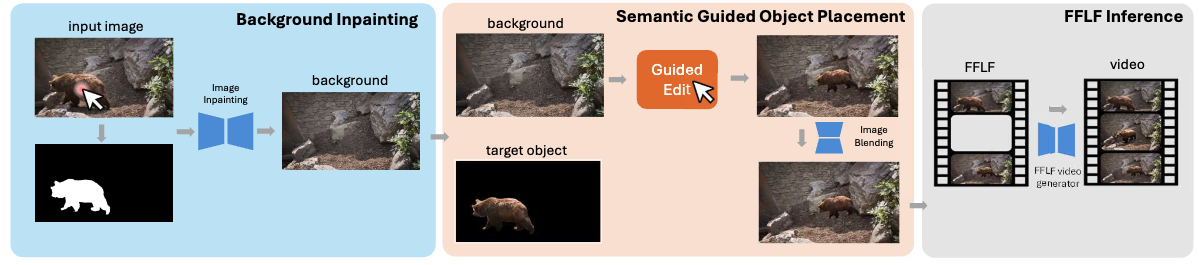
The Search2Motion Pipeline is constructed with three components, where the user can interact with the application at stage 1 (Background Inpainting) and stage 2 (Object Placement). Then the original input image and the user-edited last frame are sent to a first-frame last-frame (FFLF) video generator to acquire the final video generated based on the given input image and user preference
Search2Video Overview:
This short video describes the core idea and the overall pipeline.
Demo 1:
The following screen capture shows the steps: user starts with the first frame, then just a click on the chitah to automatically get the segmented chitah and an impainted background. Next the user automatically receives a visually grounded signal about where the Chitah can move. Once the user places the Chitah anywhere in the suggested area, the last frame of the video gets created. Next, the first-frame last-frame guided video generation happens in the final step. For the sake of easier visualization, we have captured everything running in real-time except for object insertion and video generation which takes about 2 minutes to complete.
Demo 2:
Next demo shows a bird flying animation generated using the pipeline. Note how the object motion is rendered realistic while the background changes from plain sky to the birdeye view of the scene below.
Demo 3:
The last demo shows a dynamic scene under the sea.